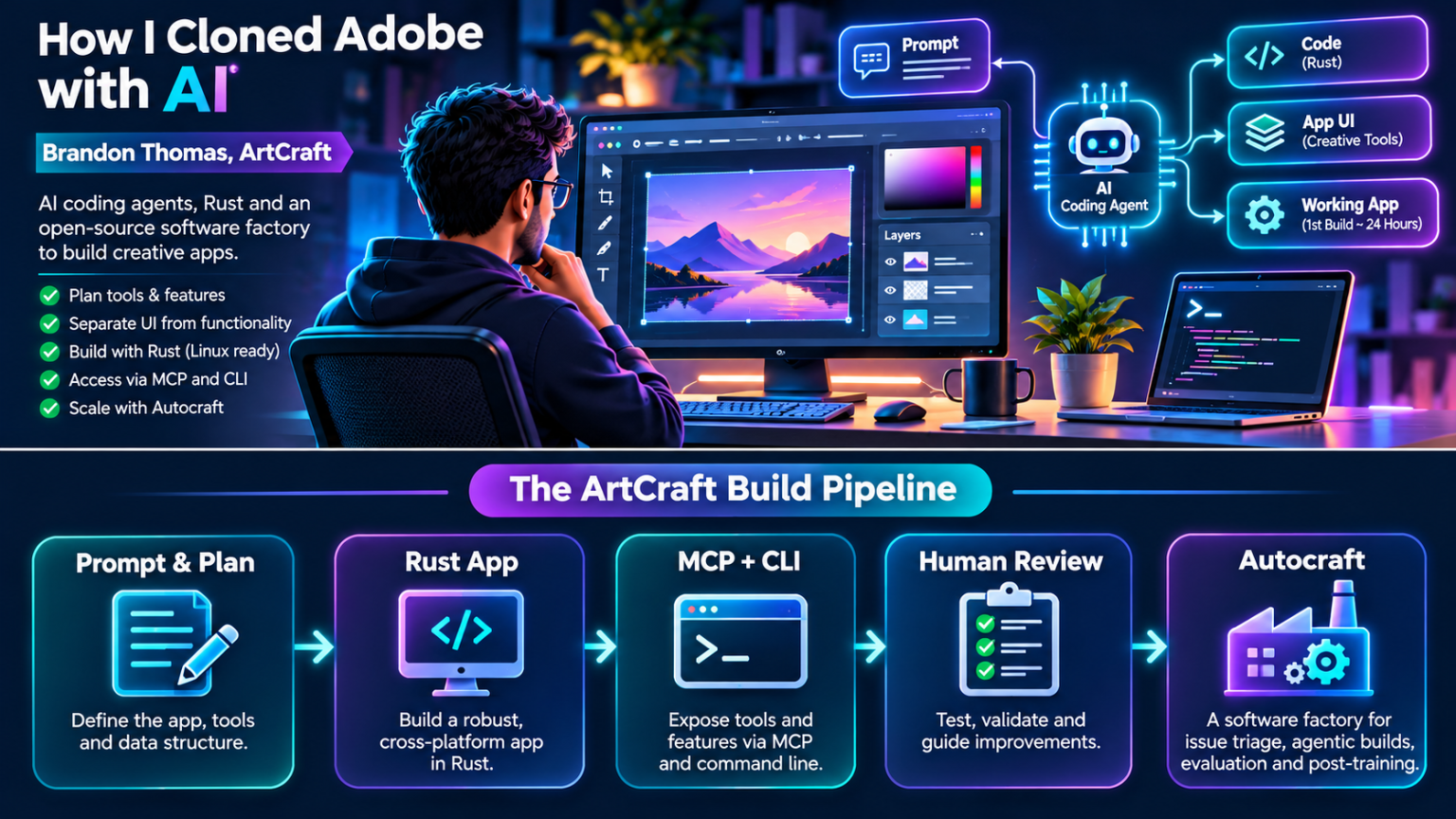
Could a small team use AI coding agents to build an alternative to Photoshop in a single day? Brandon Thomas, CEO of ArtCraft, says his team’s first Photoshop approximation took about 24 hours. The result was not a complete replacement for Adobe’s flagship editor, but it was functional enough to surprise the team—and it became the starting point for a much bigger open-source experiment.
Speaking at CODE Summit 2026, Thomas described how ArtCraft is using AI agents, the Rust programming language, reusable components and automation interfaces to build creative and productivity software. The ambition goes beyond recreating familiar interfaces. It is about giving users more control over the tools they rely on, including the ability to adapt software to their own workflows.
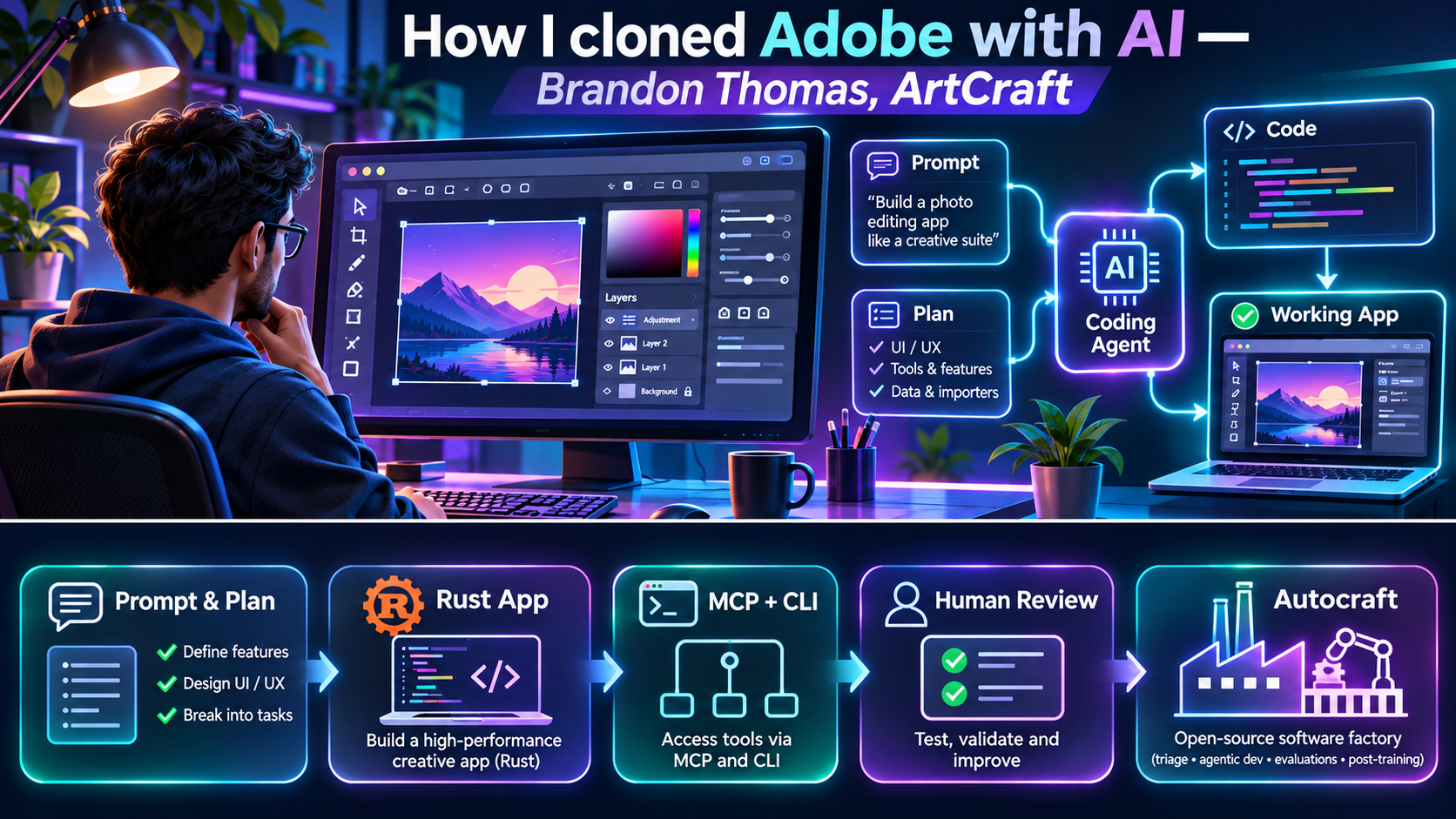
The talk also introduced Autocraft, a forthcoming open-source software factory designed to take issues, triage them, run agentic development, and use evaluations and post-training to improve the process. It points to a future in which AI does not just help write an application once; it helps maintain and improve software continuously.
Watch Brandon Thomas’s CODE Summit 2026 talk
How I cloned Adobe with AI — Brandon Thomas, ArtCraft (YouTube)
The session is titled Let’s Open Source the World. It covers the original Photoshop experiment, the response from artists and developers, other applications built by the community, Rust and cross-platform development, and the planned Autocraft system.
The Photoshop experiment that started in a day
Thomas said the team began with a broad specification for a photo-editing application. Rather than asking an AI model to produce a few isolated interface screens, they gave it a much larger job: plan the tools, define how each tool should work, separate the user interface from the underlying functionality, and think through data structures and file-format importers.
Two design choices were especially important. First, the team wanted the application to be accessible through both a graphical interface and automation. Second, it wanted the tools to be usable through Model Context Protocol (MCP) and a command-line interface (CLI), so an AI agent or script could operate them directly.
According to Thomas, within roughly 24 hours they had a working approximation of Photoshop. It looked familiar and offered enough functionality to demonstrate the idea. He also said it started much faster than the original application in their comparison.
There is an important qualification: Thomas was clear that the early build did not cover Photoshop’s full feature set. At the time of the talk, he described the project as having moved from around 50% to just over 60% of the team’s measure of feature parity. That is the team’s own estimate, not an independent benchmark. A fast first build is impressive, but it should not be confused with a mature, fully compatible professional editor.
Why familiar interfaces matter
ArtCraft’s first goal was not to invent a completely new way to edit images. It was to give existing artists an interface they could recognise. Someone who already understands layers, selection tools, brushes, masks and panels can begin working without learning an entirely new design language.
Thomas described this as meeting the muscle memory of people who use Adobe products. A familiar interface can lower the barrier to trying an alternative, particularly when the new application is still developing its feature set.
Over time, however, the team wants to explore interfaces designed specifically for AI-assisted work. Instead of forcing every task through a large collection of menus and panels, future tools could let users describe what they want, automate repetitive steps and expose the underlying capabilities directly to agents.
It did not stop at Photoshop
In the talk, Thomas said the team expanded the experiment beyond image editing. He named applications inspired by other parts of the creative and productivity software market, including:
- InDesign-style publishing: tools for page layout and document design.
- Premiere-style video editing: creative workflows for video production.
- Microsoft Office-style applications: core office productivity tools.
- Figma-style collaboration: interface design and collaborative document work.
- CAD and 3D workflows: engineering and modelling tools, including the community-led SolidCraft effort.
- Audio and animation tools: digital audio workstation experiments and work related to Flash and Adobe Animate.
- PDF Craft: a PDF application Thomas highlighted as particularly polished and useful.
These examples should be understood as projects and alternatives at different stages of development—not as proof that every product already matches the commercial software it resembles. Thomas repeatedly described a continuing process of adding features, responding to users and improving compatibility.
Open source is about ownership, not just price
A major theme of the presentation was the changing relationship between users and software. Thomas contrasted the early web—where APIs, data exports, customisation and user-built extensions were common—with today’s platform-driven environment, where access and customisation can depend heavily on a vendor’s decisions.
His argument is that open-source applications can give users more control. People can inspect the code, adapt features, contribute fixes and keep software running in environments that a commercial vendor may not prioritise.
That matters to creative professionals. A studio may have a very specific production pipeline, file structure or delivery process. A general-purpose application may cover most needs but still require staff to repeat manual work or switch between several tools. If the application is open and programmable, a team can tailor it to its own process.
Thomas described seeing artists build their own workflows on top of the software ArtCraft provided. That observation challenged the assumption that open source is mainly interesting to developers. Creative professionals can also benefit when software is modifiable and automation-friendly.
Why MCP and CLI access are central to the idea
Traditional desktop software is designed primarily for people clicking buttons, choosing menu items and moving between panels. ArtCraft’s approach adds another way to interact: tools can expose their capabilities to scripts and AI agents.
Model Context Protocol (MCP)
MCP provides a standardised way for AI applications to connect to external tools and services. When a creative application exposes useful operations through MCP, an agent can potentially call those operations as part of a larger workflow—for example, preparing assets, organising project elements or running repeatable production steps.
Command-line interface (CLI)
A CLI makes application functions accessible through commands. That is valuable for batch processing, automation, repeatable tasks and integration with build pipelines. It also makes it easier to run operations without manually navigating a graphical interface.
Thomas described ArtCraft’s applications as MCP- and CLI-first. The broader idea is that the software should be useful both to a human at a desktop and to an automated system coordinating a multi-step job.
Why ArtCraft chose Rust
Thomas discussed Rust as the foundation for the desktop applications. Rust is known for memory safety, performance and strong tooling. It can be used to build native applications and shared components, which is attractive when a team wants software that runs across operating systems.
He also addressed a common concern: whether developers need to know Rust before using AI agents to build Rust software. His answer was that they do not necessarily need prior expertise to get started, because coding agents can work with the language. However, that does not remove the need for engineers to understand the code, review architecture and diagnose problems.
One practical challenge he highlighted was compile time. Rust can produce efficient native applications, but large projects and frequent rebuilds can slow down the development loop. That becomes particularly important when agents make many small changes and need continuous feedback.
Reusable components, Linux and the CI bottleneck
Building many desktop applications creates a new challenge: maintaining common interface elements, behaviours and infrastructure without duplicating everything. Reusable UI components can help teams share menus, controls, dialogs and other building blocks across products.
Cross-platform support is another part of the project. Thomas spoke about applications running on Linux and even NetBSD, and about localisation for languages that some established commercial applications have not supported well. He also described the value of supporting software beyond the end of its commercial support lifecycle, especially when studios depend on it for real work.
But the more applications and platforms a project supports, the more testing and integration work it creates. Continuous integration (CI) systems must compile, test and package changes across different targets. If builds are slow or infrastructure is overloaded, CI can become a bottleneck that limits how quickly AI agents can iterate.
This is a reminder that AI-generated code is only one part of software engineering. Build systems, tests, packaging, compatibility and release management still determine whether a project can be delivered reliably.
Human review still matters
Thomas described a willingness to let agents iterate quickly on some desktop applications and games. But he drew a distinction between that work and changes with long-lasting consequences, such as backend architecture, API design and database schema migrations.
Those decisions can be difficult to reverse. A faulty UI adjustment may be inconvenient; a poorly planned data migration can damage customer data or disrupt a production service. Human review is therefore especially important for security, data integrity, architecture and changes that affect users at scale.
The practical lesson is not to remove developers from the process. It is to give agents bounded tasks, clear acceptance criteria and the ability to run tests, while people retain responsibility for high-impact decisions.
Autocraft: an open-source software factory
The most forward-looking part of the talk was Autocraft. Thomas described it as a code-defined, autonomous software factory that ArtCraft intends to open source.
The planned system is designed to connect several stages of software maintenance and development:
- Issue ingestion: collect bug reports, feature requests and other work items.
- Triage: classify issues and determine what needs attention.
- Agentic development: send suitable tasks to AI agents to investigate and implement changes.
- Evaluation: test the agent’s decisions and the resulting software against defined criteria.
- Post-training: use accumulated decisions and evaluations to improve future agent behaviour.
The important point is that Autocraft was presented as forthcoming. The talk did not announce a generally available release. Its proposed workflow suggests a system that can learn from the software team’s decisions and make future development cycles more consistent.
What this could mean for Adobe, Microsoft and Figma
ArtCraft’s experiment is not proof that large commercial creative platforms will disappear. Professional software has years of development behind it: complex file formats, colour management, accessibility, collaboration, plug-ins, reliability, customer support and workflows that studios depend on.
But AI coding agents may change the economics of building specialised software. A small team can now attempt projects that previously required a much larger engineering effort. Open-source communities can then contribute fixes, add features and adapt tools for their own industries.
The biggest competitive pressure may not come from a single open-source application replacing an entire suite. It may come from thousands of smaller, focused tools that do a particular job better, integrate more easily and can be customised without waiting for a vendor’s roadmap.
What developers and businesses can learn from ArtCraft
- Start with a detailed specification: define the tools, data structures, importers and expected behaviour before asking an agent to build.
- Separate interface and functionality: keep UI decisions independent from the underlying application logic where possible.
- Make software automatable: consider MCP and CLI access as part of the product design, not an afterthought.
- Build reusable components: shared UI and infrastructure can make a family of applications easier to maintain.
- Measure feature coverage honestly: a working prototype is not the same as full compatibility or production readiness.
- Keep human review for risky changes: especially for backend architecture, APIs, data migrations and security-sensitive operations.
- Invest in CI and testing: fast code generation is not useful if the build and release pipeline cannot keep up.
Final thoughts: AI could make software more personal again
Brandon Thomas’s CODE Summit presentation is interesting because it is about more than building a Photoshop lookalike quickly. It is a case study in how AI coding agents can help a team create real desktop software, expose it to automation, and invite a community to shape what comes next.
The 24-hour Photoshop approximation is the headline. The deeper idea is that software could become more adaptable: users might choose the features they need, automate repetitive work, run applications on their preferred operating systems and contribute improvements instead of being limited to a fixed product roadmap.
There is still a long road between a fast prototype and a dependable professional tool. Feature parity, file compatibility, performance, accessibility, security, CI and long-term maintenance all matter. But ArtCraft’s experiment shows why AI-assisted open-source development is worth watching.
If Autocraft arrives as described, the next step could be even more significant: not just using AI to build an application, but building an open system that helps maintain and improve applications over time.
Watch the full talk and explore ArtCraft
- CODE Summit 2026: Let’s Open Source the World — Brandon Thomas
- ArtCraft applications
- Brandon Thomas / ArtCraft GitHub profile
- CODE Summit 2026 talk page and session notes
Editorial note: This article is based on Brandon Thomas’s CODE Summit 2026 presentation and the event’s published session notes. Statements about build times, feature-parity estimates and product capabilities are attributed to the speaker and should be read as his account, not independent benchmark results. Autocraft was described as forthcoming at the time of the talk.