MCP vs RAG vs AI Agents: Simply Explained
Artificial intelligence is moving beyond simple chatbots. Modern AI applications can search company documents, retrieve database information, connect to business software, and even complete tasks automatically.
Three technologies are playing an important role in this transformation: MCP, RAG, and AI Agents.
You may have seen these terms in discussions about AI automation, intelligent assistants, and enterprise software. They are often mentioned together, but they solve different problems.
Here is the simplest way to understand them:
- MCP: Connects AI applications to external tools and services.
- RAG: Retrieves relevant information and provides it to an AI model.
- AI Agents: Use reasoning, tools, and workflows to complete tasks.
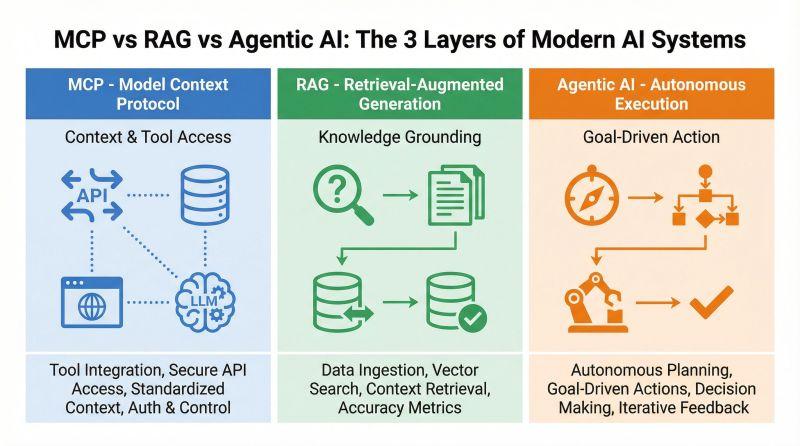
Think of MCP as the connection system, RAG as the information retrieval system, and an AI Agent as the worker that uses these capabilities to get things done.
The interesting part is that they are not competitors. They can work together to build much more capable AI applications.
Let’s explore how each technology works, where it is useful, and when you should use it.
1. What Is MCP (Model Context Protocol)?
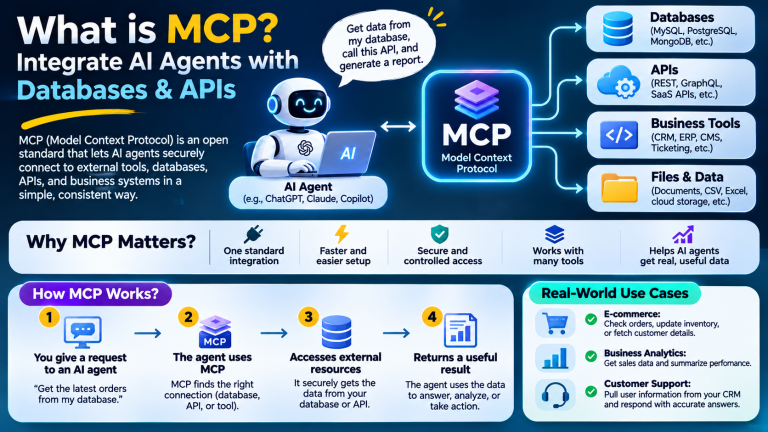
MCP stands for Model Context Protocol. It is an open protocol originally introduced by Anthropic to standardise how AI applications connect to external tools, data sources, and services.
Imagine that you have an AI assistant and want it to access your business database, retrieve customer information, check invoices, or communicate with an external API.
Without a standard integration approach, developers may need to build separate connections for different AI applications and services.
MCP provides a common communication standard that helps compatible AI applications discover and use capabilities exposed by MCP servers.
How does MCP work?
MCP follows a client-server architecture involving three main components:
MCP Host: The AI application that the user interacts with.
MCP Client: The component inside the host that communicates with MCP servers.
MCP Server: The service that exposes approved tools and information to the AI application.
For example, an MCP server could connect to:
- MySQL and PostgreSQL databases.
- REST and GraphQL APIs.
- CRM applications.
- Payment gateways.
- File storage systems.
- Hosting management platforms.
- Monitoring and analytics tools.
An AI assistant can discover the tools exposed by the MCP server and use them when needed.
Example: MCP in a business application
Imagine asking your AI assistant:
“Check the latest five customer orders and tell me which ones are still pending.”
The assistant can use an MCP server to access an authorised order-management system, retrieve the records, and summarise the results.
The user does not need to open the database administration panel or manually write an SQL query.
In simple words: MCP connects AI to the outside world.
Official documentation: https://modelcontextprotocol.io/
2. What Is RAG (Retrieval-Augmented Generation)?
RAG stands for Retrieval-Augmented Generation.
It is a technique that improves AI responses by retrieving relevant information from external knowledge sources and providing that information to the language model.
A normal language model generates responses using its learned knowledge and the information available in its current context. It does not automatically know the latest information in your private company documents, product database, or internal knowledge base.
RAG helps solve this problem.
Instead of asking the model to answer entirely from its existing knowledge, the application first searches a relevant information source and provides the results as additional context.
How does RAG work?
A typical RAG system follows three main steps.
Step 1: Retrieve
The system searches a knowledge base for information relevant to the user’s question.
The information might come from:
- PDF documents.
- Word files.
- Company policies.
- Product documentation.
- Support articles.
- Internal databases.
- Technical manuals.
Step 2: Augment
The retrieved information is added to the original user question and provided to the AI model as context.
Step 3: Generate
The AI model uses the supplied information to produce an answer.
Example: RAG for customer support
Imagine that you operate a web hosting company.
Your customers regularly ask questions about:
- Hosting plans.
- Domain registration.
- Email configuration.
- SSL certificates.
- Website migrations.
- Refund policies.
- Server troubleshooting.
You may already have hundreds of support articles and technical documents.
Rather than manually searching through these documents, you can build a RAG-powered assistant.
A customer asks:
“How can I configure an SSL certificate for my hosting account?”
The RAG system searches your documentation, retrieves the relevant instructions, and provides them to the AI model.
The assistant then generates an answer based on your actual documentation.
This makes it easier to provide answers that are relevant to your business instead of relying entirely on general AI knowledge.
What technologies are used in RAG?
A RAG implementation commonly includes:
| Component | Purpose |
|---|---|
| Document loader | Imports PDFs, Word files, web pages, and other content |
| Text splitter | Divides large documents into smaller sections |
| Embedding model | Converts text into numerical representations |
| Vector database | Stores and searches embeddings |
| Retrieval system | Finds relevant information |
| Language model | Generates the final answer |
Popular technologies include:
- PostgreSQL with pgvector.
- Qdrant.
- Weaviate.
- Chroma.
- Pinecone.
- Elasticsearch.
- OpenAI embedding models.
Not every RAG system needs a vector database. Some applications use keyword search, full-text search, hybrid search, or database queries alongside semantic retrieval.
In simple words: RAG gives AI access to the right information before it answers.
Further reading: https://cloud.google.com/use-cases/retrieval-augmented-generation
3. What Are AI Agents?
An AI Agent is an application that uses an AI model to understand a goal, decide what steps are needed, and use available tools to complete a task.
Unlike a basic chatbot that mainly responds to questions, an AI Agent can perform a sequence of operations.
Depending on its design and permissions, it may:
- Search databases.
- Call external APIs.
- Retrieve documents.
- Analyse information.
- Write reports.
- Create support tickets.
- Update business records.
- Trigger approved workflows.
The key difference is that an agent can coordinate multiple steps rather than simply generating one response.
How does an AI Agent work?
A typical AI Agent follows a workflow like this:
- Receive a user request.
- Understand the desired outcome.
- Decide which tools or information sources are required.
- Perform the required operations.
- Examine the results.
- Continue with additional steps if necessary.
- Return the result to the user.
Some agents also maintain memory, manage long-running tasks, and coordinate with other specialised agents.
Example: An AI Agent for hosting support
Imagine that a hosting customer reports:
“My website is not loading. Please check what is wrong.”
An AI Agent could:
- Retrieve the customer’s hosting account information.
- Check whether the hosting service is active.
- Query server monitoring information.
- Review relevant error logs if authorised.
- Identify possible causes.
- Prepare a troubleshooting report.
- Create a support ticket for the technical team.
This is much more than a chatbot providing generic troubleshooting advice.
The agent is using external information and tools to investigate a real problem.
However, sensitive operations such as restarting production services or changing firewall rules should require appropriate permissions and human approval.
In simple words: An AI Agent uses intelligence, information, and tools to get work done.
Further reading: https://cloud.google.com/resources/core-concepts-ai-agents
4. MCP vs RAG vs AI Agents: What’s the Difference?
Now that we understand the three technologies, let’s compare them.
| Feature | MCP | RAG | AI Agents |
|---|---|---|---|
| Full form | Model Context Protocol | Retrieval-Augmented Generation | AI Agent |
| Main purpose | Connect AI to tools and services | Retrieve relevant information | Complete tasks |
| Primary role | Communication protocol | Information retrieval technique | Intelligent application |
| Connects to databases | Through an MCP server | Through its retrieval system | Through available integrations |
| Searches documents | Can expose document-search tools | Core use case | Can use search or RAG |
| Calls APIs | Can expose API operations as tools | Not its primary purpose | Can use APIs through tools |
| Performs actions | Exposes capabilities for clients to invoke | Not inherently | Yes, when authorised |
| Typical use | Tool integration | Knowledge-based answers | Workflow automation |
The important distinction is that MCP is a protocol, RAG is an information-retrieval architecture, and an AI Agent is an application or system that can use both.
They are not three competing products that require you to choose only one.
5. A Simple Real-World Analogy
Imagine that you own an online store.
You want an AI system that can answer customer questions, retrieve product information, and check order status.
Think of the three technologies as different members of a team.
MCP is the connector
MCP provides a standard way for the AI application to communicate with your store’s database, order-management system, payment API, and other business tools.
RAG is the researcher
RAG searches your product catalogue, delivery policies, return instructions, and support documentation to find information relevant to the customer’s question.
AI Agent is the worker
The AI Agent understands the customer’s request, decides what information it needs, retrieves relevant documents, checks the order through an authorised tool, and prepares a response.
Together, they can provide a much more useful customer experience than a chatbot that only generates generic answers.
6. Can MCP, RAG, and AI Agents Work Together?
Yes. In fact, combining them is often a practical way to build advanced AI applications.
Consider an AI-powered customer support platform.
The system might use:
- An AI Agent to understand and manage the customer’s request.
- RAG to retrieve information from support documentation.
- MCP to connect to the CRM, database, billing system, and ticketing API.
- An AI model to analyse the retrieved information and generate a response.
Example workflow
A customer asks:
“Why was my latest hosting invoice not paid, and what should I do?”
The system could follow this workflow:
Step 1: Understand the request
The AI Agent identifies that the customer needs billing information and payment guidance.
Step 2: Retrieve relevant documentation
RAG searches the company’s payment instructions, billing FAQ, and troubleshooting documentation.
Step 3: Access the billing system
The agent uses an MCP-connected billing tool to retrieve the customer’s authorised invoice information.
Step 4: Analyse the result
The AI Agent examines the invoice status and compares it with the relevant payment instructions.
Step 5: Generate a response
The assistant explains the invoice status and provides the next steps.
If an operation such as issuing a refund or changing an invoice is requested, the system can require additional verification and human approval.
This is a good example of how all three technologies can work together.
7. Architecture: How to Build a Combined MCP, RAG, and AI Agent System
A modern AI application can combine these technologies in one architecture.
A simplified design looks like this:
                   USER
                     |
                     v
                AI AGENT
                     |
             +-------+-------+
             |               |
             v               v
        RAG SYSTEM       MCP CLIENT
             |               |
             v               v
       KNOWLEDGE BASE    MCP SERVERS
             |               |
       +-----+-----+     +----+-----+
       |     |     |     |    |     |
       v     v     v     v    v     v
      PDFs  Docs  FAQs  MySQL API   CRM
                         DB
             |               |
             +-------+-------+
                     |
                     v
               AI MODEL
                     |
                     v
               FINAL RESULT
                     |
                     v
                    USER
In this architecture:
- The AI Agent coordinates the workflow.
- The RAG system retrieves relevant knowledge.
- MCP provides standard connections to external tools.
- The AI model processes information and generates responses.
The architecture can be expanded with authentication, user permissions, monitoring, caching, evaluation, and human approval workflows.
8. Popular Tools and Technologies for Each Approach
Developers have several options when building applications using MCP, RAG, and AI Agents.
MCP development
MCP provides a standard protocol, with SDKs and development tools available for building servers and clients.
Popular options include:
- MCP Python SDK.
- MCP TypeScript SDK.
- MCP Inspector.
- Compatible AI coding environments.
- Custom MCP servers for databases and APIs.
Official resources:
https://modelcontextprotocol.io/
https://github.com/modelcontextprotocol/python-sdk
https://github.com/modelcontextprotocol/typescript-sdk
RAG development
RAG requires document ingestion, search, retrieval, and language-model integration.
Common technologies include:
- LangChain.
- LlamaIndex.
- Qdrant.
- Chroma.
- Weaviate.
- PostgreSQL with pgvector.
- Elasticsearch.
- OpenAI embedding models.
The best choice depends on your document volume, search requirements, hosting environment, and budget.
AI Agent development
Agent frameworks help developers build applications that can plan, use tools, manage state, and execute multi-step workflows.
Some options include:
- LangGraph.
- OpenAI Agents SDK.
- Microsoft Agent Framework.
- Google Agent Development Kit.
- Custom Python or TypeScript agent implementations.
You do not always need an agent framework. A small application with a controlled sequence of tool calls may be easier to build and maintain without one.
9. Which One Should You Use?
The right choice depends on the problem you want to solve.
Choose MCP when you need external integrations
Use MCP when your AI application needs a standard way to communicate with databases, APIs, business applications, or other tools.
For example:
- Connect an AI assistant to MySQL.
- Retrieve WHMCS customer records.
- Check server monitoring data.
- Access a CRM application.
- Interact with internal business APIs.
Choose RAG when your AI needs company knowledge
Use RAG when you want AI to answer questions based on your own documents and frequently changing information.
For example:
- Search company documentation.
- Build a technical support assistant.
- Answer questions about product manuals.
- Search internal policies.
- Provide answers using an approved knowledge base.
Choose AI Agents when you need task automation
Use AI Agents when your application needs to coordinate several operations to reach a goal.
For example:
- Investigate server alerts.
- Generate sales reports.
- Manage support workflows.
- Analyse customer requests.
- Coordinate approved business operations.
A quick decision guide
| Your requirement | Recommended approach |
|---|---|
| Connect AI to an external database | MCP |
| Answer questions from PDF documents | RAG |
| Search company knowledge | RAG |
| Connect AI to a payment API | MCP |
| Automate a multi-step workflow | AI Agent |
| Build an intelligent customer-support system | AI Agent + RAG + MCP |
| Create an AI server-monitoring assistant | AI Agent + MCP |
| Build an internal knowledge assistant | RAG, optionally with MCP |
10. Example: Build an AI Assistant for a Hosting Business
Let’s consider a practical example for a web hosting company.
A hosting business may already use several different systems:
- WHMCS for billing and customer management.
- MySQL or MariaDB for application data.
- Zabbix for server monitoring.
- A ticketing system for customer support.
- Internal documentation for troubleshooting.
- APIs for payments and domain management.
You could build an AI-powered operations assistant around these existing systems.
Where MCP fits
Create MCP servers that expose approved tools for:
- Retrieving customer information.
- Checking invoice status.
- Looking up hosting services.
- Retrieving monitoring alerts.
- Searching support tickets.
- Accessing domain information.
Where RAG fits
Create a knowledge base using:
- WHMCS documentation.
- Hosting setup guides.
- Server troubleshooting articles.
- Internal support procedures.
- Frequently asked questions.
- Technical manuals.
The RAG system retrieves relevant information when the assistant needs to answer a question.
Where the AI Agent fits
The agent coordinates the work.
For example, an administrator asks:
“Check why this server is showing high disk I/O and prepare a troubleshooting report.”
The agent could:
- Query Zabbix through an authorised MCP tool.
- Retrieve current disk and database metrics.
- Search internal troubleshooting documentation using RAG.
- Compare the observed symptoms with known causes.
- Prepare a report with supporting evidence.
- Recommend the next diagnostic steps.
This could save administrators time and make operational information easier to access.
The agent should not automatically modify production server settings without the appropriate approval.
11. Security Considerations
Combining these technologies can create powerful applications, but it also introduces security responsibilities.
An AI system connected to business databases and APIs must not receive unrestricted access.
Follow these practices:
Use least-privilege permissions: Give each integration access only to the information and operations it requires.
Protect API credentials: Store secrets in secure environment configuration or a secrets manager.
Validate tool inputs: Never assume that arguments generated by an AI model are trustworthy.
Control database access: Use read-only database accounts for reporting and search operations wherever possible.
Protect retrieved information: RAG systems should respect document permissions and avoid exposing confidential information to unauthorised users.
Prevent prompt injection: Treat external documents, database records, and API responses as untrusted content.
Require approval for sensitive actions: Financial operations, account changes, and server administration should have suitable confirmation and access controls.
Monitor activity: Record tool usage and relevant security events without logging unnecessary sensitive information.
Security should be part of the architecture from the beginning, not something added after deployment.
12. The Future: Combining MCP, RAG, and AI Agents
The future of AI applications is not simply about creating models that can generate better text.
Businesses increasingly want AI systems that can access current information, understand their internal data, and perform useful tasks.
MCP, RAG, and AI Agents address different parts of that challenge.
MCP helps connect AI applications to external services.
RAG helps ground AI responses in relevant information.
AI Agents coordinate tools and workflows to accomplish goals.
As these technologies mature, we can expect more applications that combine knowledge retrieval, tool integration, and automated decision-making.
However, successful implementations will still depend on good data, clear permissions, reliable integrations, testing, and human oversight.
Frequently Asked Questions
Is MCP the same as RAG?
No. MCP is a communication protocol for connecting AI applications to tools and data sources. RAG is a technique that retrieves relevant information and provides it to an AI model before generating an answer.
Is RAG an AI Agent?
No. RAG is an information retrieval and generation approach. An AI Agent is an application that can use reasoning and tools to perform tasks. An agent can use RAG as one of its capabilities.
Can MCP work without an AI Agent?
Yes. A compatible AI application can use MCP to access tools and resources without implementing a fully autonomous agent. MCP provides connectivity, not the agent’s decision-making logic.
Can an AI Agent work without MCP?
Yes. Agents can use native function calling, direct API integrations, or other tool interfaces. MCP is one standard way to connect external capabilities.
Can RAG work without a vector database?
Yes. RAG can use keyword search, full-text search, database queries, semantic search, or hybrid retrieval. Vector databases are common but not mandatory.
Do MCP and RAG work together?
Yes. An MCP server can expose a document-search tool or access to a knowledge service, while a RAG pipeline retrieves relevant information and supplies it to an AI model.
Which technology should beginners learn first?
Start with the concept that solves your immediate problem. Learn RAG if you want to build a document-based assistant, MCP if you want to connect AI to external tools, and AI Agent fundamentals if you want to automate multi-step tasks.
Are MCP, RAG, and AI Agents free?
The protocols and many development frameworks are available as open-source projects, but the complete system may involve paid AI model usage, hosting, database infrastructure, vector search services, and external APIs.
Conclusion
MCP, RAG, and AI Agents are three important building blocks in modern AI development, but they serve different purposes.
MCP connects AI applications to external tools and services. RAG provides relevant information from documents and knowledge sources. AI Agents use these capabilities to plan and complete tasks.
The simplest way to remember the difference is:
- MCP = Connect
- RAG = Retrieve
- AI Agents = Act
You do not have to choose only one. In many real-world applications, combining all three provides a much stronger solution.
Whether you are building a customer-support assistant, a database-powered chatbot, a business analytics platform, or an AI-powered server monitoring system, understanding these differences will help you choose the right architecture.
The real opportunity is not just making AI answer questions. It is giving AI the right information, the right tools, and the ability to complete useful work safely.