What Is MCP? Integrate AI Agents with Databases & APIs
1. What Is MCP (Model Context Protocol)?
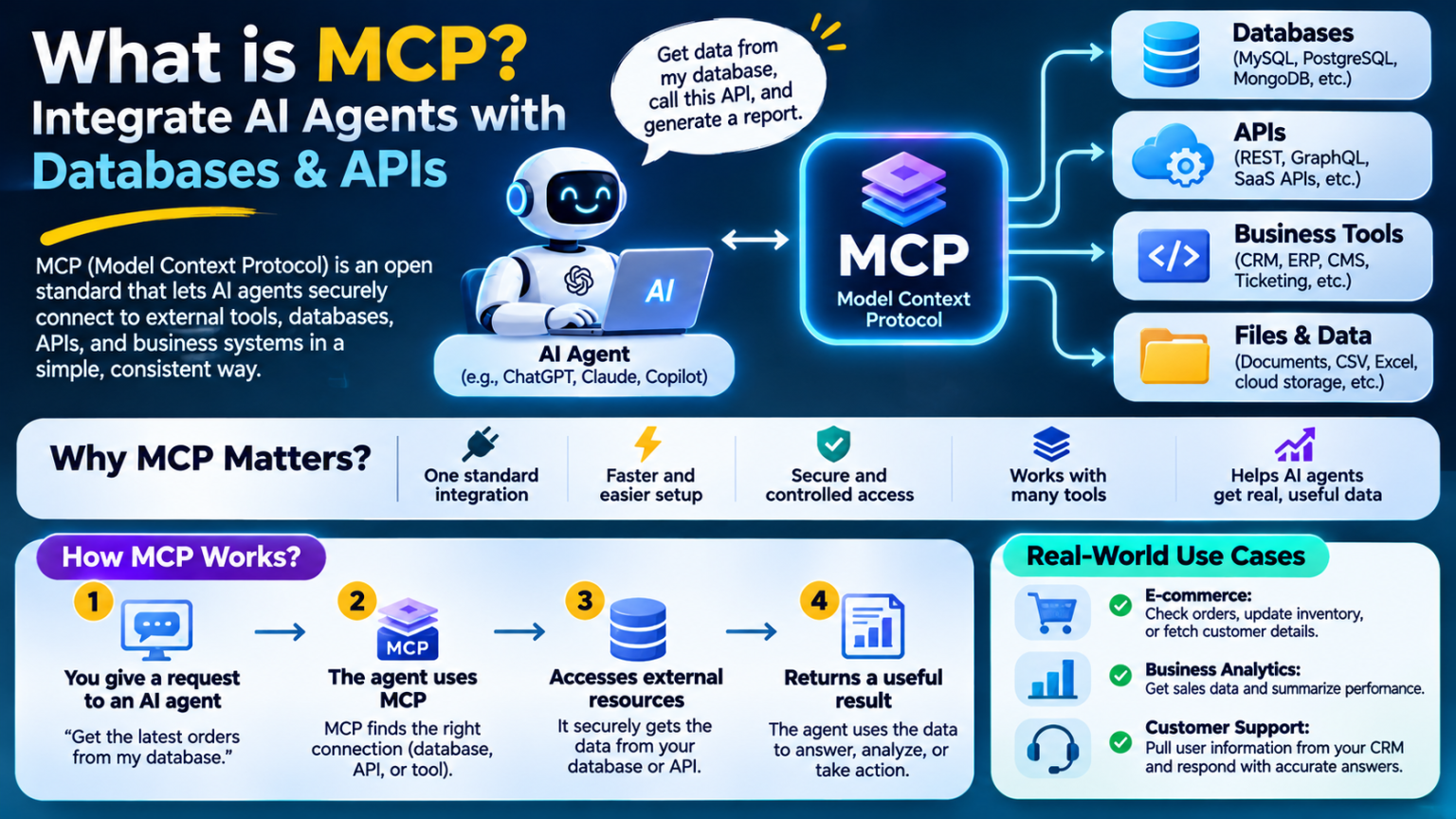
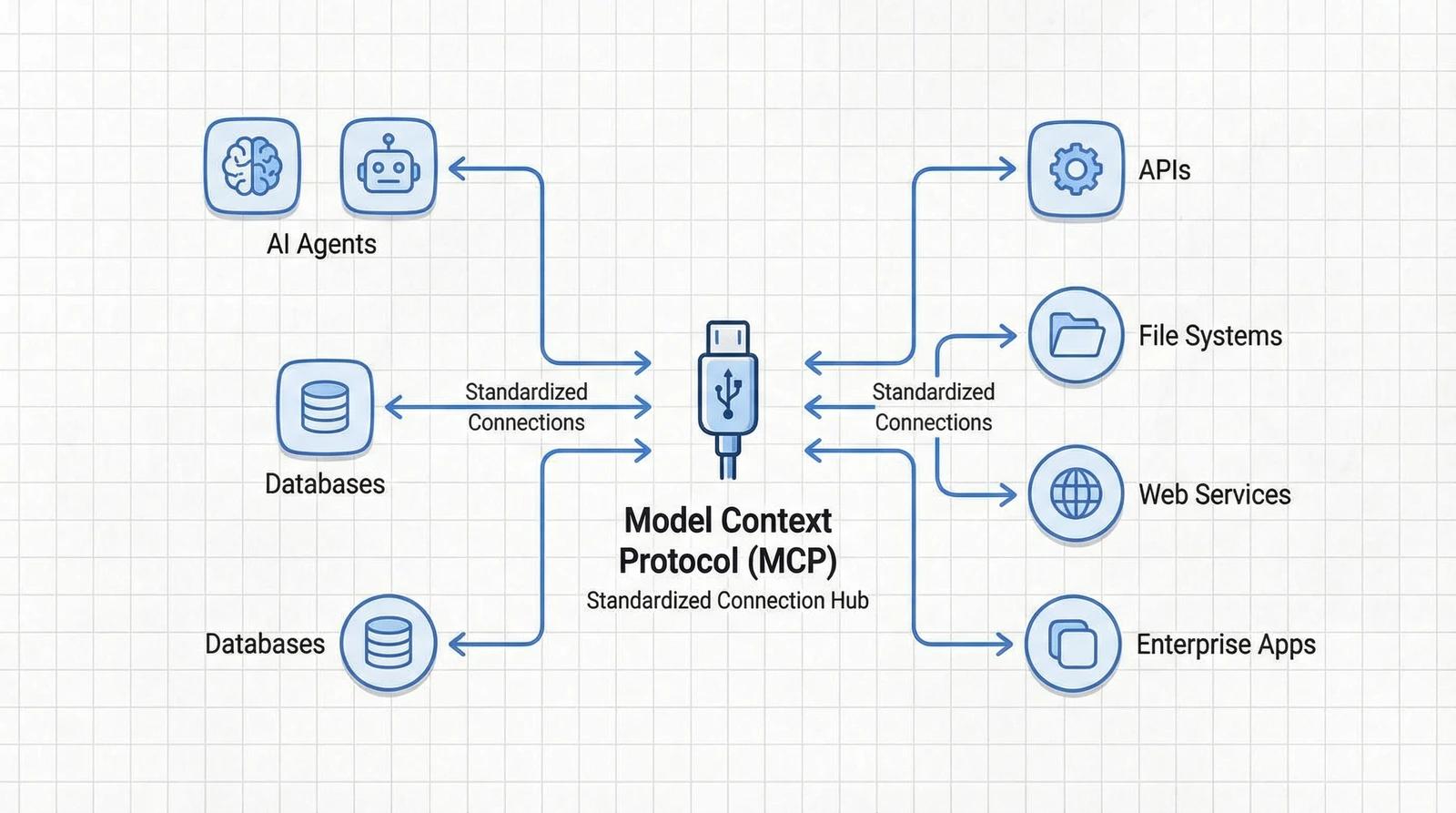
MCP stands for Model Context Protocol. It is an open protocol originally introduced by Anthropic to standardise how AI applications connect to external data sources and tools.
A simple way to understand MCP is to think of it as a universal connection standard for AI applications.
Without a common protocol, developers may need to create separate integrations for different AI assistants. With MCP, an application can expose its capabilities through an MCP server, allowing compatible AI clients to discover and use those capabilities.
MCP is not an AI model, a database, or an API gateway. It is a communication protocol that helps AI applications interact with external systems in a consistent way.
For example, imagine asking an AI assistant:
“Show me this month’s sales, identify the five best-selling products, and prepare a report.”
The AI assistant can use an MCP connection to access authorised database information, retrieve sales records, analyse the results, and generate a response.
Instead of manually exporting spreadsheets and uploading them to an AI tool, the assistant can work with information through a controlled integration.
Official documentation: https://modelcontextprotocol.io/
2. Why Do AI Agents Need MCP?
An ordinary AI chatbot primarily works with the information available in its conversation and the knowledge it has learned during training. It does not automatically know the latest information in your private business database.
For example, an AI model cannot automatically know:
- How many orders your business received today.
- Which customers have unpaid invoices.
- How much stock remains in your warehouse.
- Which support tickets are still open.
- Whether a payment was successful.
- What happened in your application during the last hour.
To access that information, developers need to connect the AI application to external systems.
Traditionally, this meant building custom API integrations, writing additional authentication code, and maintaining separate connections for different AI platforms.
MCP provides a common interface for these integrations.
Without MCP
A developer may need to build separate connections between an AI application and each external service.
For example:
- AI assistant to MySQL.
- AI assistant to PostgreSQL.
- AI assistant to a CRM API.
- AI assistant to an invoicing application.
- AI assistant to a file storage service.
As the number of integrations increases, development and maintenance become more complicated.
With MCP
An MCP server exposes specific capabilities through a standard protocol.
An AI application that supports MCP can connect to the server and discover the available tools and information.
The same MCP server can potentially work with multiple compatible AI clients, reducing the need to create a completely different integration for every application.
3. How Does MCP Work?
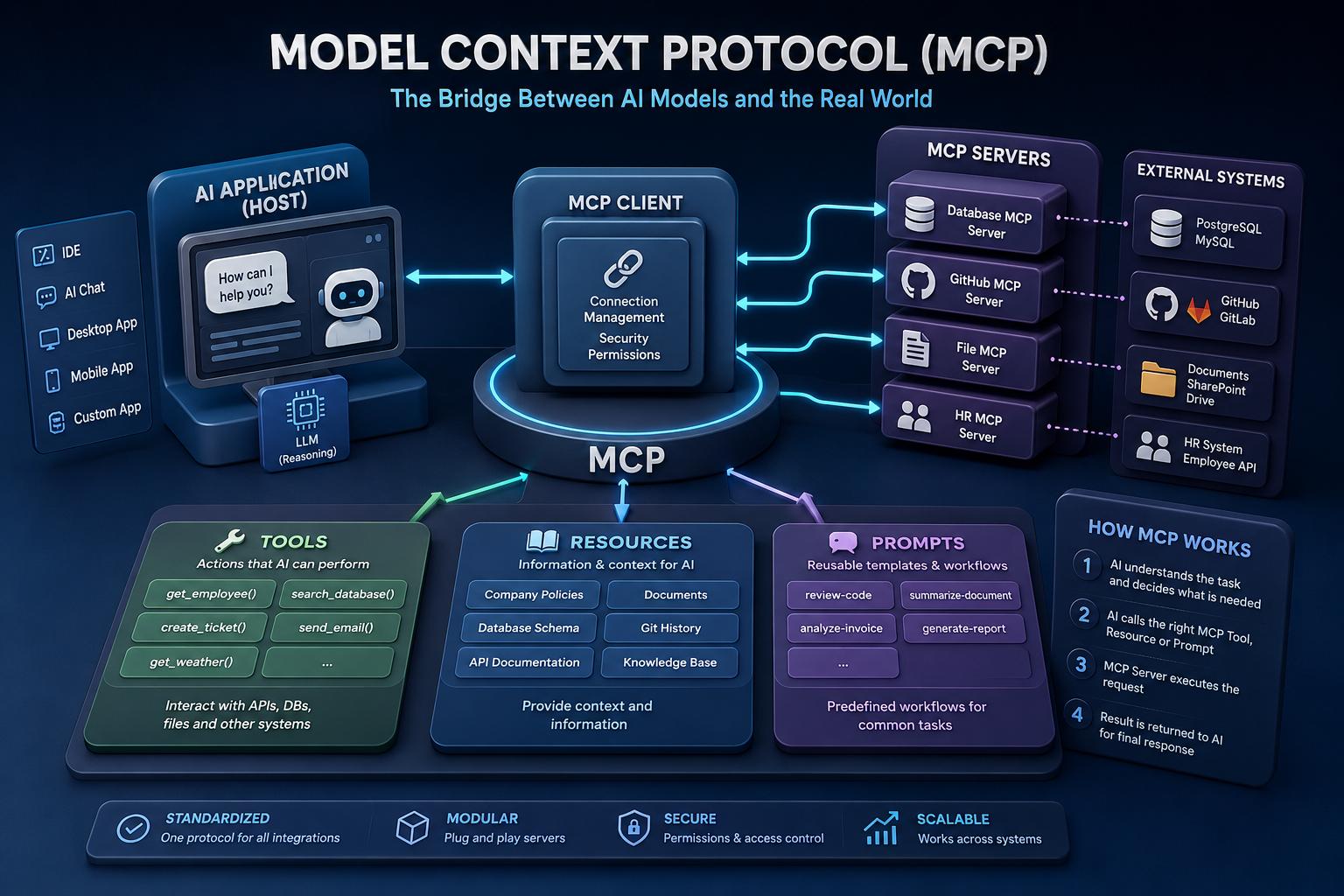
MCP uses a client-server architecture. There are three important components.
MCP Host
The host is the main AI application that the user interacts with.
Examples include compatible AI assistants, coding environments, and agent applications.
The host manages the conversation and coordinates connections to MCP servers.
MCP Client
The MCP client operates inside the host application. It establishes and manages communication with an MCP server.
It handles protocol messages, discovers available capabilities, and passes tool results back to the host.
MCP Server
The MCP server is the component that exposes external functionality.
It can connect to databases, APIs, file systems, business applications, and other services.
For example, you could build separate MCP servers for:
- MySQL database access.
- PostgreSQL reporting.
- WHMCS customer management.
- Payment gateway information.
- Website analytics.
- Internal company documents.
Each server can expose a specific set of capabilities.
A simple MCP architecture
The general architecture looks like this:
             USER
               |
               v
         AI APPLICATION
           (MCP Host)
               |
               v
           MCP CLIENT
               |
               v
           MCP SERVER
               |
       +-------+-------+
       |       |       |
       v       v       v
    MySQL    REST API  Files
    Database CRM       Storage
       |       |       |
       +-------+-------+
               |
               v
       RESULTS TO AI AGENT
               |
               v
        RESPONSE TO USER
The important point is that the AI application does not need to understand the internal implementation of every external service. The MCP server provides a standard interface for accessing its approved capabilities.
The official MCP architecture documentation explains the roles of hosts, clients, and servers in more detail.
Reference: https://modelcontextprotocol.io/docs/learn/architecture
4. The Three Main MCP Capabilities
MCP provides three important server-side building blocks: tools, resources, and prompts.
Tools: Let AI perform actions
Tools allow an AI application to invoke functions exposed by an MCP server.
Examples include:
- Search customer records.
- Retrieve an invoice.
- Check order status.
- Query sales information.
- Create a support ticket.
- Call an external API.
- Update a database record, when authorised.
Tools are particularly useful when an AI agent needs to perform an operation rather than simply read information.
For example, an MCP server could expose a tool called get_customer_orders.
The AI agent can discover the tool, understand its input parameters, and call it when the user asks about customer orders.
Resources: Provide information to AI
Resources expose information that an AI application can retrieve as context.
Examples include:
- Database schemas.
- Product documentation.
- Configuration files.
- Customer information.
- Application documentation.
- Internal knowledge-base content.
Resources are useful when an AI agent needs background information before answering a question.
For example, an MCP server could expose a database schema so that an AI assistant can understand the available tables and relationships.
Prompts: Provide reusable instructions
Prompts are reusable templates that help organise interactions.
For example, a business reporting MCP server could provide a predefined prompt for generating a monthly sales report.
Instead of writing the same instructions repeatedly, a compatible AI application can use the prompt template.
These three capabilities make MCP flexible enough to support both simple integrations and more advanced AI workflows.
Official reference: https://modelcontextprotocol.io/docs/learn/server-concepts
5. How to Connect an AI Agent to a Database Using MCP
One of the most useful applications of MCP is connecting an AI agent to a database.
Imagine that your business uses MySQL or PostgreSQL to store customer information, orders, invoices, and payment records.
You want to ask questions in natural language instead of manually writing SQL queries.
For example:
“Show me all orders received today.”
Or:
“Which customers have unpaid invoices?”
An MCP server can expose approved database operations as tools.
Step 1: Prepare your database
First, identify the database you want the AI application to access.
Common choices include:
| Database | Typical use |
|---|---|
| MySQL | Websites and business applications |
| MariaDB | Web hosting and application databases |
| PostgreSQL | Business systems and analytics |
| MongoDB | Document-oriented applications |
| SQLite | Lightweight applications and local data |
Create a dedicated database account for the integration.
Avoid using your database administrator account. Give the MCP service only the permissions it needs.
For a reporting assistant, read-only database permissions are usually a sensible starting point.
Step 2: Create an MCP server
You can build an MCP server using supported SDKs.
Python and TypeScript are common choices.
For example, Python developers can use the official MCP Python SDK.
Documentation:
https://github.com/modelcontextprotocol/python-sdk
A simplified Python example using the FastMCP interface looks like this:
from mcp.server.fastmcp import FastMCP
import os
import mysql.connector

mcp = FastMCP("Business Database")

def get_db_connection():
    return mysql.connector.connect(
        host=os.environ["DB_HOST"],
        user=os.environ["DB_USER"],
        password=os.environ["DB_PASSWORD"],
        database=os.environ["DB_NAME"]
    )

@mcp.tool()
def get_total_orders() -> int:
    """Return the total number of orders."""

    connection = get_db_connection()

    try:
        cursor = connection.cursor()
        cursor.execute("SELECT COUNT(*) FROM orders")
        result = cursor.fetchone()
        return int(result[0])
    finally:
        connection.close()

if __name__ == "__main__":
    mcp.run(transport="stdio")
This example exposes a simple database function as an MCP tool.
The AI agent does not directly receive unrestricted database access. It can only call the functionality that the MCP server makes available.
For production use, add connection pooling, error handling, timeouts, structured logging, input validation, and appropriate database access controls.
Step 3: Expose useful database operations
You can add more tools depending on your requirements.
For example:
@mcp.tool()
def get_order_by_id(order_id: int) -> dict:
    """Retrieve an order using its ID."""

    connection = get_db_connection()

    try:
        cursor = connection.cursor(dictionary=True)

        cursor.execute(
            """
            SELECT id, customer_id, status, total
            FROM orders
            WHERE id = %s
            """,
            (order_id,)
        )

        result = cursor.fetchone()

        return result or {"error": "Order not found"}

    finally:
        connection.close()
This example uses a parameterised SQL query rather than combining user-provided input directly into SQL.
That distinction is important for preventing SQL injection.
In a real application, also enforce which users are allowed to access which customer records. Database permissions alone do not automatically provide application-level customer isolation.
Step 4: Connect the MCP server to an AI agent
Once the server is ready, configure an MCP-compatible AI application to connect to it.
For a local development setup, the client can launch the MCP server as a subprocess using the standard input/output transport.
For remote deployments, MCP supports Streamable HTTP.
The AI application discovers the available tools and can use them when relevant to the user’s request.
The precise configuration format depends on the AI application.
Step 5: Ask the AI agent a question
Once the connection is working, try a request such as:
Show me the total number of orders.

Then retrieve the latest 10 orders
and summarise their status.

Do not modify any database records.
The AI application can select the appropriate MCP tools, retrieve the results, and explain the information in natural language.
This is one of the biggest advantages of MCP: users can work with business information through normal conversations.
6. Integrating MCP with REST APIs
Databases are only one part of the picture.
Most modern businesses depend on multiple APIs for payments, customer management, communication, shipping, analytics, and other operations.
MCP can provide a consistent way to expose those API operations to AI agents.
Consider a business that uses:
- A CRM system.
- A payment gateway.
- An invoicing platform.
- A shipping service.
- An email marketing platform.
An MCP server can expose selected operations from each service.
Example: Payment gateway integration
Suppose you want an AI agent to check the status of a payment.
Instead of giving the AI model unrestricted access to the payment provider, your MCP server could expose a tool such as:
get_payment_status(payment_id)The MCP server then:
- Validates the payment identifier.
- Authenticates with the payment provider.
- Calls the relevant API endpoint.
- Validates the API response.
- Returns a limited set of payment details.
- Makes the result available to the AI application.
The user could then ask:
“Check whether payment PAY-10245 was successful.”
The agent can use the approved tool to retrieve the information.
Example: CRM integration
A CRM-connected MCP server might expose:
| MCP tool | Purpose |
|---|---|
| search_customers | Search customer records |
| get_customer | Retrieve customer details |
| get_customer_orders | Retrieve order history |
| create_support_ticket | Create a support ticket |
| update_customer_status | Update an approved customer field |
The available operations should reflect the business permissions granted to the AI agent.
For example, a customer-support assistant might be allowed to read customer records and create support tickets but not delete customer accounts.
7. MCP vs Traditional API Integration
MCP and APIs are not competing technologies. They solve different parts of an integration problem.
An API defines how an application communicates with a particular service.
MCP provides a standard protocol through which AI applications can discover and use tools and context exposed by servers.
| Feature | Traditional API integration | MCP |
|---|---|---|
| Main purpose | Application-to-application communication | AI application-to-tool/context communication |
| Interface | API-specific endpoints | Standardised MCP capabilities |
| Discovery | Often custom or documented separately | Protocol-based capability discovery |
| AI agent integration | Usually requires custom orchestration | Designed for compatible AI clients |
| Database access | Through application APIs or database drivers | Through tools and resources exposed by a server |
| Reusability | Depends on the integration | One server can support multiple compatible clients |
| Security | API authentication and permissions | Transport authentication plus tool-level controls |
MCP does not eliminate APIs. In many implementations, the MCP server simply acts as an AI-friendly interface around existing APIs.
8. MCP Transport: How AI Applications Communicate
MCP needs a way to transfer messages between clients and servers.
The current specification defines two standard transport mechanisms.
STDIO transport
STDIO is commonly used for local MCP servers.
The AI application launches the server as a local process and communicates through standard input and standard output.
This is useful for:
- Local development tools.
- File-system integrations.
- Local database connections.
- Coding assistants.
- Developer workflows.
It avoids the need to expose a local server over a network.
Streamable HTTP transport
Streamable HTTP is designed for communication with remote MCP servers.
The MCP server runs as an independent service and exposes an HTTP endpoint. Clients communicate using HTTP requests, with optional Server-Sent Events for streaming responses.
This is useful when:
- Multiple AI clients need access to a shared service.
- The MCP server runs on a cloud server.
- Business applications need centralised integration.
- Remote access and authentication are required.
Use proper authentication, HTTPS, request validation, and access controls for remote deployments.
Technical reference: https://modelcontextprotocol.io/specification/2026-07-28/basic/transports
9. Real-World MCP Use Cases
MCP can be useful in almost any business that needs AI agents to access external information or perform controlled operations.
E-commerce automation
An AI shopping assistant could connect to a product database, inventory API, order management system, and shipping service.
It could answer questions such as:
- Which products are running low on stock?
- What is the status of a customer’s order?
- Which products generated the most sales?
- Which orders have not been dispatched?
Customer support automation
A customer-support assistant could use MCP to connect to a CRM, ticketing platform, and customer database.
It could retrieve relevant account information, summarise previous conversations, and create support tickets.
Sensitive operations should still require the appropriate permissions and approval.
Business analytics
An AI analytics agent could connect to a PostgreSQL database or reporting API.
Users could ask:
“Compare this month’s revenue with last month’s revenue.”
The agent could retrieve the required information and produce a summary or report.
IT infrastructure monitoring
An MCP server could expose monitoring tools from systems such as Zabbix, Prometheus, or other infrastructure platforms.
An AI agent could:
- Retrieve server health information.
- Check CPU and memory usage.
- Review disk-space alerts.
- Summarise recent incidents.
- Identify recurring monitoring problems.
For actions such as restarting services or modifying firewall rules, require explicit approval and strong permission controls.
Hosting and WHMCS automation
Hosting businesses can also benefit from MCP.
An MCP server could expose selected WHMCS operations, such as:
- Search client records.
- Retrieve invoice information.
- Check service status.
- Retrieve support-ticket information.
- Check domain renewal dates.
- Summarise outstanding invoices.
For example, an administrator could ask:
“Show me customers with invoices overdue by more than seven days.”
The MCP server could retrieve authorised billing information and return a structured result.
For a hosting provider, this could become the foundation of an AI-assisted support and administration platform.
10. Security: What You Must Consider Before Connecting MCP
MCP can provide AI agents with access to valuable business systems. That makes security an essential part of the design.
An incorrectly configured MCP server could expose customer information, financial data, private files, or administrative functionality.
Follow these practices before deploying MCP in production.
Use least-privilege access
Give the MCP server only the permissions required for its purpose.
For example, a reporting assistant should generally use a read-only database account.
Do not connect an AI assistant to a production database using the root or administrator account.
Protect API credentials
Store API keys and passwords in a secure secrets manager or protected environment configuration.
Do not place credentials directly in prompts, source code, public configuration files, or logs.
Require authentication for remote servers
Remote MCP servers should use appropriate authentication and authorisation.
Use HTTPS, validate tokens, and ensure that credentials are issued for the correct service.
Do not simply accept arbitrary tokens from an AI client and forward them to another API. Token passthrough can create serious security problems.
Validate every tool input
Never assume that an AI-generated tool argument is trustworthy.
Validate identifiers, filter values, query parameters, file paths, and other inputs on the server.
Use parameterised database queries and allowlisted operations.
Control sensitive operations
Reading a database record and deleting a customer account are very different actions.
For operations involving payments, customer records, account deletion, server administration, or configuration changes, require explicit user approval where appropriate.
Protect against prompt injection
Data retrieved from a website, database, document, or API may contain malicious instructions.
The MCP server should treat external content as untrusted data. The AI agent must not follow instructions embedded in retrieved information as though they were trusted system instructions.
Monitor MCP activity
Record which tools were called, when they were called, and whether the operations succeeded.
Avoid storing passwords, access tokens, and unnecessary personal information in logs.
Official security guidance:
https://modelcontextprotocol.io/docs/tutorials/security/security_best_practices
11. MCP vs AI Agents: Understanding the Difference
MCP and AI agents are often discussed together, but they are not the same thing.
An AI agent is the system that interprets a request, decides what steps to take, and uses available tools to accomplish a task.
MCP is one way that agent applications can discover and communicate with external tools and information sources.
For example:
- AI model: Understands the user’s request and generates decisions.
- AI agent: Organises the steps needed to complete the task.
- MCP client: Connects the AI application to MCP servers.
- MCP server: Exposes approved tools and data.
- Database or API: Provides the actual business information or performs the operation.
Together, these components can support more capable AI applications.
12. Building Your Own MCP Server: A Practical Development Roadmap
If you want to create an MCP integration for your own business application, start with a small and well-defined project.
A sensible development plan looks like this:
Step 1: Identify the system
Choose the database, API, or business application you want to connect.
Step 2: Define the required tools
List the operations the AI agent should be allowed to perform.
For example, a database assistant might need get_orders, search_customers, and get_invoice_status.
Step 3: Build the MCP server
Use an official MCP SDK for Python, TypeScript, or another supported language.
Step 4: Add authentication
Configure secure access to the underlying database or API.
Step 5: Define permissions
Separate read-only operations from operations that modify business data.
Step 6: Connect an MCP-compatible AI application
Configure the client and verify that it can discover the tools exposed by the server.
Step 7: Test the integration
Test normal requests, invalid inputs, missing permissions, network failures, and potentially malicious input.
Step 8: Deploy and monitor
For remote deployments, use secure transport, authentication, logging, monitoring, and a controlled release process.
Do not begin by exposing every database table and administrative function. Start with a small set of useful, low-risk tools and expand only when the security model is established.
13. What Is the Future of MCP?
AI applications are moving beyond simple question-and-answer interfaces.
Businesses increasingly want AI systems that can interact with internal data, retrieve real-time information, coordinate workflows, and perform useful tasks.
MCP helps address the integration challenge by providing a common protocol for exposing external capabilities.
The protocol is also evolving. The July 28, 2026 specification introduced a stateless protocol core, updated request handling, authorisation improvements, and changes to Streamable HTTP.
These developments are important for developers building larger, more interoperable AI systems.
Potential areas of growth include:
- AI-powered business administration.
- Automated customer support.
- Database and reporting assistants.
- AI-assisted software development.
- Infrastructure monitoring.
- Enterprise knowledge management.
- Multi-agent business workflows.
MCP does not guarantee that every AI application will work with every server automatically. Compatibility still depends on supported protocol versions, client capabilities, authentication, and the tools implemented by each server.
Official specification: https://modelcontextprotocol.io/specification/2026-07-28
Frequently Asked Questions
What does MCP stand for?
MCP stands for Model Context Protocol. It is an open protocol that standardises how AI applications connect to external tools, data sources, and services.
Is MCP an AI model?
No. MCP is not an AI model. It provides a communication standard that allows compatible AI applications to interact with external systems.
Can MCP connect to MySQL and PostgreSQL?
Yes. An MCP server can expose approved database operations through tools and provide information such as database schemas through resources. The server handles the actual database connection.
Can MCP connect to REST APIs?
Yes. Developers can build MCP servers that call existing REST APIs and expose selected operations to AI agents.
Is MCP free and open source?
The MCP specification is open, and official SDKs and development tools are available as open-source projects. Individual services and infrastructure used alongside MCP may have their own costs and licences.
Can I use MCP with ChatGPT?
ChatGPT supports MCP-based integrations in supported product experiences and configurations. The exact connection and deployment options depend on the product, plan, and environment. Developers can also use compatible MCP clients and SDKs to build their own integrations.
Is MCP secure?
MCP provides mechanisms for structured communication and authentication, but security depends on how the server, client, credentials, and underlying services are implemented. Use least-privilege access, validate inputs, protect credentials, and require approval for sensitive operations.
What is the difference between MCP and an API?
An API defines how software communicates with a particular service. MCP provides a standard interface through which compatible AI applications can discover and use tools and context exposed by MCP servers. MCP servers frequently call APIs behind the scenes.
Conclusion
MCP is an important development in the evolution of AI applications because it provides a common way to connect AI agents with external systems.
Instead of building a completely separate integration for every AI assistant, developers can expose database operations, API functionality, files, and business tools through MCP servers.
For businesses, this creates opportunities to build AI-powered customer support, reporting, automation, and administration systems.
For developers, MCP offers a reusable integration approach that can connect existing applications with compatible AI clients.
The best way to get started is to build a small MCP server, expose a few useful database or API operations, connect it to an AI agent, and test the complete workflow.
AI becomes much more useful when it can work with the right information and tools. MCP provides one of the building blocks that makes that possible.