Websites Across the World Hit by Millions of Attempts to Exploit PHP Code Flaw
Websites and online services around the world are facing a serious cybersecurity threat after attackers began making widespread attempts to exploit two critical vulnerabilities in PHP, one of the technologies behind millions of websites and web applications.
The vulnerabilities, tracked as CVE-2026-109618 and CVE-2026-109619, could allow an attacker to execute malicious code on a vulnerable server without logging in first. Security researchers have reported a rapid surge in exploitation attempts following the disclosure of the flaws and the release of security updates.
The incident, associated with the name PHP2Shell, has put website owners, hosting providers, developers, and security teams on alert.
The immediate concern is straightforward: a vulnerable PHP installation could provide an attacker with an opportunity to gain control over a web server, access sensitive information, or disrupt an online service.
However, it is important to distinguish attempted exploitation from confirmed breaches. Millions of attempts do not automatically mean millions of websites have been compromised.
What Happened?
On October 21, 2026, the PHP development team released security updates addressing two critical vulnerabilities in the PHP runtime.
The response was swift. According to reporting from cybersecurity researchers and industry sources, exploitation attempts increased sharply around the time the vulnerabilities became public.
Cloudflare reported that activity grew from thousands of attempts to hundreds of thousands and eventually millions across its network. Amazon Threat Intelligence also reported observing PHP2Shell exploitation attempts before the public disclosure, raising concerns about how early some attackers may have obtained information about the flaws.
These reports illustrate how quickly attackers can move once a vulnerability becomes known. Public proof-of-concept code and technical discussions can help defenders understand a problem, but they can also make exploitation easier for criminals.
Sources:
- Cloudflare’s reported exploitation activity, covered by IT Pro
- Amazon Threat Intelligence’s PHP2Shell investigation
What Is PHP2Shell?
PHP2Shell is the name being used in security reporting for activity associated with the two PHP vulnerabilities. They affect the PHP runtime itself rather than being limited to one particular website, content management system, or plugin.
PHP is widely used to build dynamic websites, APIs, online stores, customer portals, and hosting management applications. Popular platforms such as WordPress, Drupal, and Joomla rely on PHP in their server-side operation.
That broad use creates a large potential attack surface when a serious flaw affects the underlying runtime.
An attacker does not necessarily need to discover a weakness in a particular WordPress plugin or obtain an administrator password if the server’s PHP runtime is itself vulnerable. The precise conditions for exploitation still depend on the PHP version, deployment configuration, and affected execution path.
Understanding the Two Critical PHP Vulnerabilities
Both vulnerabilities received a CVSS v4.0 severity score of 9.2, placing them in the critical category.
CVE-2026-109618: Remote code execution through memory corruption
This vulnerability involves PHP’s handling of out-of-memory conditions.
When a PHP request encounters an exceptional memory condition, parts of the runtime’s internal state may not be initialized as expected. Under certain circumstances, request cleanup can then interact with invalid memory state.
A successful exploit may turn this memory-handling problem into remote code execution.
In practical terms, an attacker could potentially cause the PHP worker to execute malicious instructions under its operating-system privileges.
CVE-2026-109619: Stale internal state and use-after-free
The second vulnerability concerns internal state that may continue to reference request memory after that memory has been released.
This is commonly associated with a class of memory-management weaknesses known as use-after-free.
If the runtime subsequently uses that stale state before it has been correctly reset, an attacker may be able to trigger unsafe memory operations and potentially achieve remote code execution.
Both vulnerabilities are serious because they affect the runtime responsible for processing web requests. A successful attack could have consequences beyond a single page or application feature.
Official details:
Which Websites and Servers Are at Risk?
The vulnerabilities affect PHP versions before the corresponding patched releases. The PHP team has issued fixes for the following branches:
| PHP branch | Fixed release |
|---|---|
| PHP 8.5 | 8.5.12 |
| PHP 8.4 | 8.4.27 |
| PHP 8.3 | 8.3.36 |
| PHP 8.2 | 8.2.35 |
PHP 8.1 and older versions are also affected, but they are no longer supported by the PHP project and do not receive fixes through its normal release process.
The vulnerabilities may affect installations serving web requests through configurations and runtimes including:
- PHP-FPM
- Apache with mod_php
- CGI-based PHP deployments
- FrankenPHP
- LiteSpeed
The PHP security team has highlighted particular concern around Apache’s mod_php configuration because a demonstrated exploit can trigger the issue before application-level code runs.
This does not mean other PHP deployments are safe. Website owners should identify every PHP runtime exposed to web requests and follow the relevant vendor’s remediation instructions.
Why Hosting Providers Face a Major Challenge
For hosting companies, one vulnerable PHP installation can be only the beginning of a much larger operational problem.
A shared hosting server may run hundreds of websites, with different customers using different PHP versions. A single physical or virtual server can therefore contain several separate PHP runtimes that need attention.
Hosting providers need to establish which versions are running, identify the sites and services that depend on them, deploy fixes, restart affected processes where necessary, and confirm that the updated runtime is actually being used.
The work becomes more complicated when customers have older applications that cannot run on a modern PHP version or when a control panel maintains several independently installed PHP branches.
Hosting teams should prioritise internet-facing systems, communicate clearly with customers, and verify the outcome of every update.
For cPanel & WHM administrators, the vendor has published guidance and package updates for the affected EasyApache PHP versions.
Reference: cPanel’s critical PHP security release.
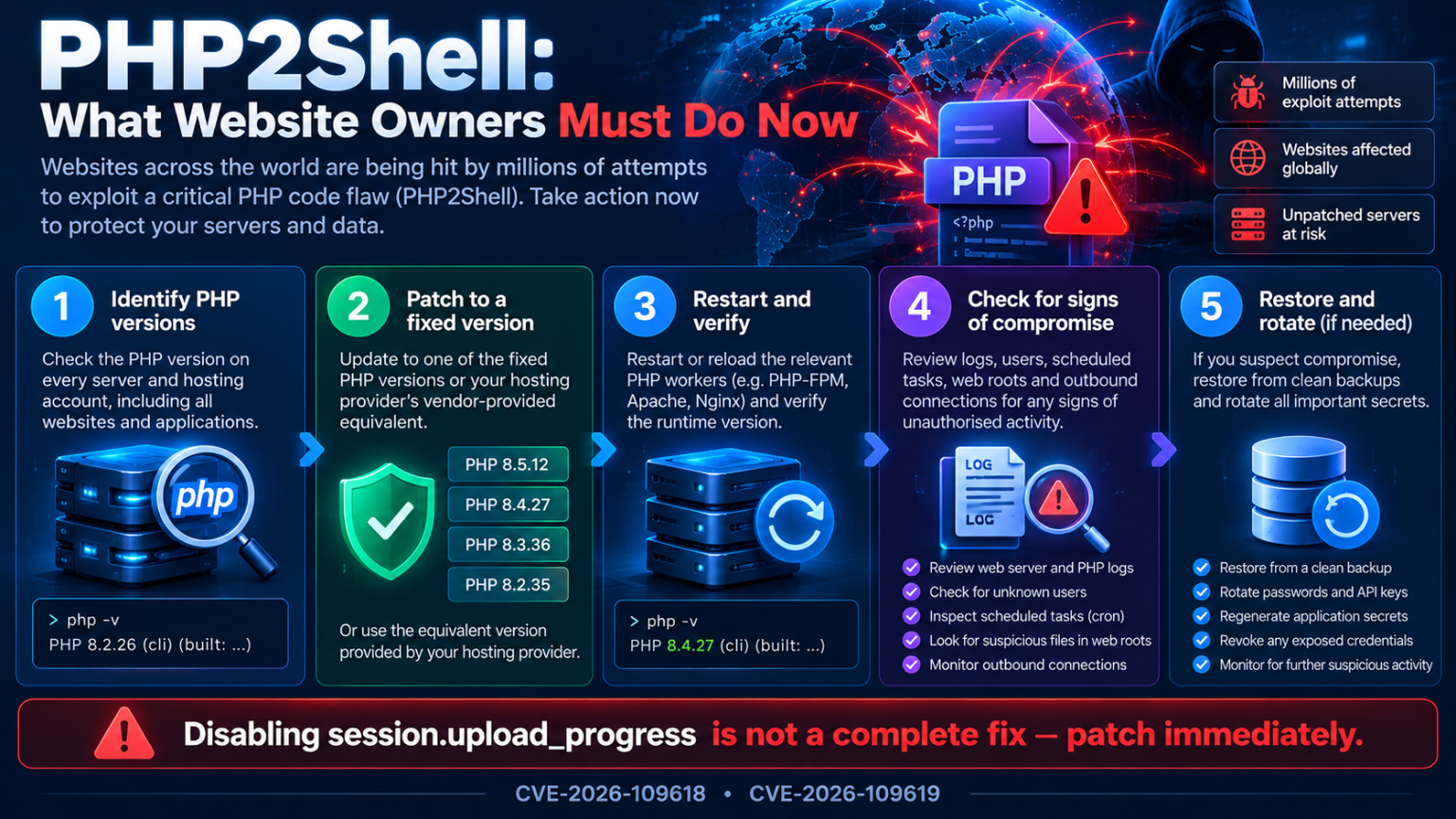
What Website Owners Should Do Immediately
The best response is to treat this as an urgent patching exercise rather than wait for evidence that a particular website has been attacked.
1. Identify every PHP version in use
Do not check only the PHP version used by your command-line terminal. Websites may use a different PHP version through PHP-FPM, Apache, LiteSpeed, a hosting control panel, or a separate application pool.
For command-line PHP, run:
php -vFor PHP-FPM, inspect the installed services and package versions using the commands appropriate for your operating system.
If you manage multiple sites, check each site’s assigned PHP version in the hosting panel as well.
2. Install the appropriate security update
Upgrade each affected runtime to its corresponding fixed release, or to a later supported release supplied by your operating-system or hosting vendor.
On cPanel & WHM, review the vendor’s current remediation instructions and update the relevant packages. The documented update command for the affected EasyApache packages is:
/scripts/rpmupRun it according to cPanel’s guidance and verify that the expected package updates have been installed. Package availability can vary by system and support channel.
On other distributions, use the supported package manager or the deployment process recommended by your provider.
Do not assume that updating one PHP branch automatically updates every other installed branch.
3. Restart or reload affected PHP services
After the update, follow the package vendor’s instructions for restarting or reloading the affected PHP workers and web services where required.
Then verify the runtime version used by the live website. A command-line update alone does not prove that a web-facing PHP-FPM pool or another runtime has been patched.
4. Investigate possible compromise
Patching prevents further exploitation through the fixed vulnerability, but it cannot undo an intrusion that may already have happened.
Review relevant PHP, web server, authentication, and system logs for unusual activity. Check for unfamiliar accounts, unexpected scheduled jobs, modified website files, suspicious processes, and unexplained outbound network connections.
If you find credible evidence of compromise, isolate the affected system as appropriate and follow an incident-response process. Preserve relevant logs and evidence before making changes that could destroy useful forensic information.
5. Protect credentials and backups
If compromise is suspected, rotate affected credentials and application secrets from a clean environment. Consider database passwords, API keys, hosting credentials, deployment tokens, and other secrets accessible to the compromised service.
Restore files or systems from verified clean backups when necessary. Before bringing a restored system back online, ensure that the vulnerability is patched and the initial access route has been addressed.
Is Disabling session.upload_progress Enough?
No. Disabling session.upload_progress should not be treated as a complete fix for these vulnerabilities.
A configuration workaround may reduce exposure to a particular attack path or serve as a temporary precaution in some environments. However, it does not replace the security updates addressing CVE-2026-109618 and CVE-2026-109619.
PHP’s security guidance identifies the patched releases as the appropriate remediation. Administrators should not delay installing them because a workaround has been applied.
Where a system cannot be patched immediately, follow guidance from the PHP project, the operating-system vendor, and the hosting provider. Consider restricting exposure or temporarily taking the affected service offline when the risk cannot otherwise be managed.
What About WordPress, Joomla, and Drupal?
Website owners should understand that the vulnerabilities originate in PHP, not exclusively in any one content management system.
Updating WordPress core, installing a Joomla security release, or updating Drupal modules does not necessarily update the PHP runtime underneath the application.
A secure response therefore has several layers:
- Patch the affected PHP runtime.
- Install security updates for the CMS and its extensions.
- Remove unsupported plugins and themes.
- Review administrative accounts and file permissions.
- Investigate suspicious activity if the server may have been exposed.
- Keep a tested, recoverable backup.
For WordPress websites, hosting providers may manage the PHP runtime, but site owners should still confirm that their hosting account is using a patched version.
How Can Hosting Providers Reduce the Risk?
Hosting providers should treat the incident as both a technical remediation task and a customer communication issue.
A practical response plan includes:
- Inventory PHP runtimes: Identify affected versions across all hosting nodes and application pools.
- Prioritise exposed systems: Address internet-facing and higher-risk configurations first.
- Deploy verified updates: Use supported package channels and established change-management procedures.
- Confirm the live version: Verify PHP-FPM pools, Apache configurations, LiteSpeed deployments, and other relevant runtimes.
- Monitor for suspicious activity: Review available telemetry, web logs, system logs, and outbound connections.
- Communicate with customers: Explain what was updated, whether customer action is required, and what to do if a site is suspected of compromise.
- Plan for unsupported PHP: Move end-of-life workloads to a supported version or use a vendor-supported extended security arrangement where available.
Providers should also review how quickly they can patch servers during an emergency. A tested deployment process can make a significant difference when attackers are already scanning for vulnerable systems.
Could Attackers Steal Data or Take Over Servers?
Successful remote code execution can have serious consequences, but the actual impact depends on the privileges of the affected PHP worker and the surrounding security controls.
Potential consequences include:
- Access to application data available to the PHP process.
- Modification of website content or application files.
- Installation of malicious scripts or persistent access mechanisms.
- Attempts to access database credentials and application secrets.
- Use of compromised servers for additional attacks.
- Service disruption or resource abuse.
A PHP worker does not automatically have unrestricted root access. Operating-system permissions, container boundaries, network segmentation, and other controls may limit what an attacker can do.
Even so, the possibility of remote code execution without authentication makes immediate patching and careful incident assessment essential.
Frequently Asked Questions
What is PHP2Shell?
PHP2Shell is the name associated with reported exploitation of two critical PHP vulnerabilities, CVE-2026-109618 and CVE-2026-109619. Successful exploitation could allow an unauthenticated attacker to execute code on an affected server.
Have millions of websites been hacked?
Not necessarily. Reports describe millions of exploitation attempts, not millions of confirmed successful intrusions. Each website needs to be assessed based on its PHP version, exposure, patch status, and available evidence.
Which PHP versions should I install?
The PHP team released fixes in PHP 8.5.12, 8.4.27, 8.3.36, and 8.2.35. Use the appropriate fixed release or a later supported version, following your vendor’s compatibility and upgrade instructions.
Does updating WordPress fix the PHP vulnerabilities?
Not by itself. WordPress updates application code, while this incident requires patching the underlying PHP runtime as well. Update both layers where applicable.
Is PHP 8.1 still receiving official security fixes?
PHP 8.1 and older versions have reached end of life and are not receiving fixes for these issues through the PHP project’s normal release process. Plan a migration to a supported version or consult a reputable extended-support provider.
What should I do if I cannot patch immediately?
Prioritise remediation, consult your vendor’s guidance, and consider restricting access or temporarily taking the affected service offline if necessary. Do not rely solely on disabling session.upload_progress.
How can I check whether my website has been compromised?
Review web server, PHP, and system logs; look for unexpected accounts, changed files, suspicious scheduled tasks, and unusual outbound traffic. If you find signs of intrusion, preserve evidence and follow a structured incident-response process.
Final Thoughts
The PHP2Shell incident is a reminder that vulnerabilities in widely deployed infrastructure can create a problem for a huge range of websites in a short time.
The reported surge in exploitation attempts makes it especially important for website owners and hosting providers to act quickly. But patching should be only the first step: administrators also need to confirm that the fixed runtime is serving traffic and investigate whether a vulnerable system was already compromised.
If you manage a PHP-based website, hosting server, or web application, check your PHP versions today, apply the appropriate security updates, and review the official guidance.
The most important action is clear: patch the vulnerable PHP runtime and verify the result.
Official resources
- PHP security advisory and fixed releases
- UK National Cyber Security Centre advisory
- NHS England Digital: PHP2Shell security alert
- cPanel & WHM security update guidance
- Amazon Threat Intelligence analysis
This article provides general cybersecurity information. Consult the relevant vendor advisory and your hosting provider for remediation instructions specific to your environment.